Ornamental Floral Photoshop Brushes: Enhancing Design Workflows with Vintage Botanical Elements
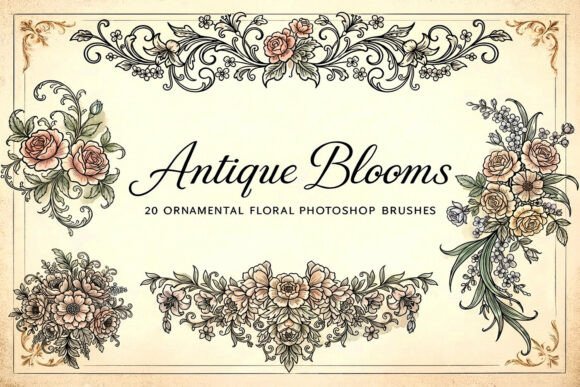
Designers seeking refined, high-detail floral elements for elegant and vintage-themed projects can benefit greatly from using Ornamental Floral Photoshop Brushes. This collection of 20 high-resolution brushes is crafted to emulate the intricate detail of classic botanical engravings. Designed with AI assistance, the set includes roses, peonies, cherry blossoms, lilies, branches, floral swirls, decorative borders, bouquets, and ornamental arrangements—each brush offering a clean, detailed stamp-style application in Adobe Photoshop.
Understanding the Role of Ornamental Floral Photoshop Brushes in Creative Workflows
Incorporating botanical elements into digital design often requires a balance between authenticity and usability. Ornamental Floral Photoshop Brushes serve as a bridge between traditional botanical illustration and modern digital design. Whether you're working on a book cover, a wedding invitation, or branding material, these brushes provide a consistent, scalable way to integrate vintage floral motifs without the need for hand-drawn illustrations or complex layer work.
Each brush is delivered in an ABR file format, making it simple to load directly into Photoshop. This streamlined format allows for immediate use, reducing the time needed to source or create botanical graphics from scratch. For professionals working under tight deadlines or hobbyists aiming for a polished look, this brush set offers efficiency and quality in one package.
How These Brushes Fit Into the Design Process
The versatility of Ornamental Floral Photoshop Brushes allows them to be used at various stages of a design project. Here’s how they can fit into a typical creative workflow:
- Preparation and Planning: During the concept phase, these brushes can help visualize layout ideas by quickly adding floral accents to mockups or mood boards.
- Execution and Development: As the design takes shape, the brushes can be applied to create borders, background elements, or focal points that enhance the overall aesthetic.
- Refinement and Finalization: In the final stages, they allow for subtle adjustments—adding texture, depth, or finishing touches that elevate the design from good to exceptional.
Integration with Other Tools and Assets
These brushes are not standalone tools but are designed to complement other digital assets and software commonly used in design workflows. Here’s how they can interact with your existing toolkit:
- Adobe Photoshop Compatibility: As ABR brushes, they integrate seamlessly into Photoshop, allowing for layer adjustments, color blending, and masking techniques.
- Pairing with Typography: The vintage botanical style pairs well with serif fonts and script typefaces, making them ideal for wedding stationery, book covers, and elegant branding materials.
- Use with Other Graphics: These brushes can be layered with vector illustrations, watercolor textures, or scanned botanicals to create composite designs with depth and dimension.
For those working in other design software, these brushes can still be useful when exporting elements as PNGs or layered PSD files for use in Illustrator, InDesign, Canva, or Figma.
Practical Use Cases and Design Applications
Ornamental Floral Photoshop Brushes are especially effective in projects requiring a touch of elegance and historical charm. Here are some real-world applications where these brushes can make a significant impact:
- Journal and Planner Design: Create decorative dividers, corner accents, and floral headers for digital or printable planners.
- Wedding and Event Stationery: Add vintage botanical flourishes to invitations, thank-you cards, and envelope liners.
- Book Covers and Editorial Layouts: Enhance titles or background layouts with classic floral motifs that evoke a timeless aesthetic.
- Branding and Packaging: Integrate into logo designs, label artwork, or packaging concepts for lifestyle, wellness, or artisanal brands.
- Printable Art and Home Decor: Use in creating wall art, greeting cards, and fabric patterns for personal or commercial use.
Optimizing Efficiency and Consistency
One of the key advantages of using Ornamental Floral Photoshop Brushes is the consistency they bring to your design output. Because each brush is pre-designed with a uniform style, you can maintain visual harmony across multiple projects or within a single multi-page layout. Here are some tips to make the most of this consistency:
- Organize Your Brush Presets: Load all 20 brushes into a custom brush preset folder in Photoshop for easy access and management.
- Adjust Brush Settings: Experiment with spacing, scattering, and transfer settings to adapt the brush stroke to your specific layout needs.
- Create Reusable Layer Styles: Save frequently used color overlays or blending modes as layer styles for quick application across different designs.
- Use Smart Objects: Convert frequently used floral elements into Smart Objects to preserve quality when resizing or transforming.
Long-Term Use and Workflow Integration
As with any digital asset, long-term usability depends on organization, compatibility, and adaptability. Since these brushes are in a widely supported format (ABR), they are likely to remain functional across Photoshop updates. To ensure smooth integration into your evolving workflow:
- Back Up Your Presets: Save your custom brush library to a cloud drive or external storage to avoid losing access after system changes.
- Update Your Design Toolkit: Periodically review your brush collection and update or expand it as your design needs evolve.
- Combine with New Assets: As you acquire new textures, fonts, or illustration tools, test how the floral brushes interact with them to maintain a cohesive style.
Conclusion: A Practical Addition to Any Designer’s Toolkit
Ornamental Floral Photoshop Brushes offer a blend of elegance and efficiency that is rare in digital design resources. By providing high-resolution, AI-crafted floral elements in a format that integrates directly into Photoshop, they help streamline the design process while maintaining a high level of visual quality. Whether you're working on a commercial branding project or a personal scrapbook layout, these brushes can enhance your creative output with minimal effort.
For designers who frequently incorporate botanical motifs or vintage aesthetics, this brush set becomes more than just a tool—it becomes a consistent, reliable asset that supports both creativity and productivity. With thoughtful integration and regular use, Ornamental Floral Photoshop Brushes can help you maintain a polished, professional look across your digital projects.