24 Halloween Photoshop Stamp Brushes for Spooky Design Projects
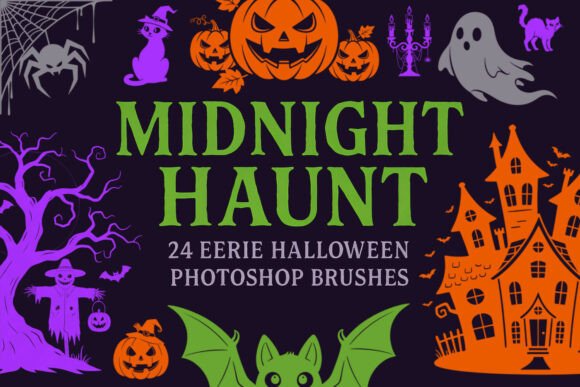
Designing for Halloween doesn’t have to mean hours of drawing or searching for the perfect graphics. The 24 Halloween Photoshop Stamp Brushes offer a fast, high-quality solution for creators who want to inject seasonal flair into their work. This brush set includes a variety of classic spooky motifs—ghosts, bats, twisted trees, witches, cats, and more—all rendered as sharp, AI-generated silhouettes. Whether you're building themed branding, designing social media posts, or crafting seasonal artwork, these brushes provide a consistent and professional look with just a few clicks.
Designed for Versatility and Detail
Each brush in the 24 Halloween Photoshop Stamp Brushes collection is created with high resolution, ensuring that every element maintains clarity whether scaled for print or used digitally. The ABR file format makes integration into Photoshop seamless, allowing designers to apply these elements without the need for manual resizing or adjustments. These brushes are ideal for projects that require atmospheric depth and visual storytelling—think invitations, digital scrapbooks, themed packaging, or editorial layouts with a spooky edge.
Visually, the set leans into classic Halloween iconography but with a clean, modern twist. The silhouettes are bold yet refined, avoiding over-the-top cartoonishness in favor of subtle eeriness. This makes them suitable not just for playful Halloween cards, but also for more sophisticated branding or editorial work that embraces a gothic or autumnal aesthetic.
Applications Across Creative and Commercial Projects
One of the standout features of the 24 Halloween Photoshop Stamp Brushes is their adaptability. They work beautifully in both personal and commercial design projects. For marketers and small business owners, these brushes can be used to create cohesive seasonal campaigns—whether that's social media graphics for a boutique, themed packaging for a limited-edition product, or promotional posters for a haunted house event.
- Print design: Flyers, posters, greeting cards, and themed packaging benefit from the crisp, scalable nature of these brushes.
- Digital design: Social media posts, blog headers, and website graphics can be elevated with a few well-placed Halloween elements.
- Editorial and publishing: Illustrations for seasonal magazines, book covers, or digital zines gain a thematic edge with minimal effort.
- Craft and personal use: Scrapbooking, DIY invitations, and handmade cards become more expressive with these professional-grade graphics.
Enhancing Visual Consistency and Brand Perception
Consistency is key in brand identity, and the 24 Halloween Photoshop Stamp Brushes help maintain that across seasonal campaigns. When used in conjunction with a cohesive color palette and typography, these brushes contribute to a unified visual language. For example, a café launching a Halloween latte special can use the same brush graphics across Instagram posts, printed flyers, and window decals, reinforcing brand recognition through repeated visual motifs.
These brushes also support professional results without requiring advanced illustration skills. Their one-click application makes them accessible to beginners while still offering enough depth for experienced designers to layer and manipulate for more complex compositions. This accessibility ensures that even those with limited design experience can maintain a polished look in their seasonal materials.
Practical Tips for Using These Brushes Effectively
When incorporating the 24 Halloween Photoshop Stamp Brushes into your work, it's important to consider how they interact with other design elements. Here are a few practical recommendations:
- Test brush placement: Before finalizing your layout, try different brush placements to ensure they enhance rather than overwhelm the composition.
- Layer with textures: Add depth by layering these brushes with grunge textures or gradient overlays to create a more dimensional effect.
- Adjust opacity and blending modes: Subtle use of these brushes—especially when set to Multiply or Overlay blending modes—can add atmosphere without distracting from core content.
- Pair with complementary fonts: If your project includes text, choose fonts that match the tone of the brushes. A bold, distressed display font pairs well with spooky graphics, while a clean sans serif keeps the design from feeling too cluttered.
- Check licensing: Make sure the brushes are cleared for commercial use if you're designing for clients or selling your work. These brushes are typically licensed for both personal and commercial applications, but it's always wise to confirm.
Final Thoughts: A Must-Have for Seasonal Designers
The 24 Halloween Photoshop Stamp Brushes aren’t just another seasonal graphic pack—they’re a time-saving, professional-grade tool for creators across disciplines. Whether you're a marketer building a themed campaign, a designer crafting seasonal artwork, or a small business owner putting together promotional materials, this brush set delivers both visual appeal and practical utility. Their clean application, high resolution, and versatile style make them a reliable asset for anyone looking to add a touch of Halloween magic to their projects without sacrificing quality or consistency.