Glitter and Sparkle Brushes for Procreate: Digital Magic at Your Fingertips
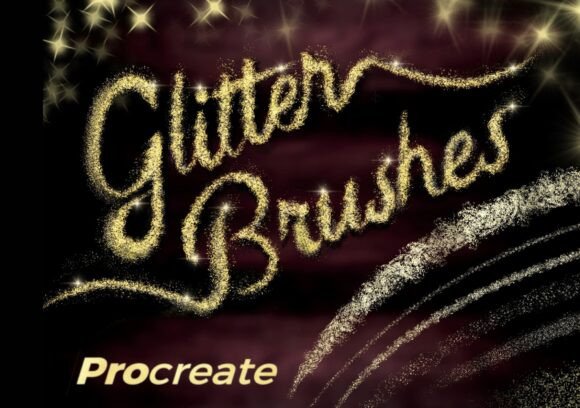
Adding visual interest and dynamic texture to digital artwork can elevate your creative output from good to unforgettable. That’s where Glitter and Sparkle Brushes for Procreate come in. These 10 high-quality brushes are more than just decorative—they’re versatile tools that can transform your digital projects with a touch of luminous magic. Whether you're illustrating, designing, or crafting, these brushes offer a seamless way to introduce sparkle and shimmer into your work.
Why Glitter and Sparkle Brushes Matter
Digital art often lacks the tactile richness of physical media. That’s where specialized brushes like these shine. Glitter and Sparkle Brushes for Procreate replicate the effect of real-world glitter, light reflections, and magical ambiance—without the mess. They’re especially useful for illustrators, graphic designers, content creators, and digital painters who want to add visual pop to their work without relying on external effects or complex layer styles.
Key Features That Stand Out
- High-quality texture – Each brush is designed with precision to mimic authentic sparkle and shimmer.
- Layer-friendly design – Works beautifully with layer modes and blending options in Procreate.
- Versatile application – Suitable for everything from digital cards to UI/UX elements and fantasy illustrations.
- Customizable intensity – Control the density and spread of glitter by adjusting pressure or brush size.
Real-World Uses for Digital Sparkle
These brushes aren’t just for holiday cards and fantasy art—though they do those exceptionally well. Here are a few practical applications across different creative and professional fields:
For Digital Artists and Illustrators
Adding a subtle shimmer to a character’s eyes or a magical glow to a scene can create emotional depth and visual intrigue. The Glitter and Sparkle Brushes for Procreate allow for precise control, so you can enhance specific elements without overwhelming the composition. Try duplicating your glitter layer and switching to “Add” or “Screen” blend modes for a more radiant effect.
In Graphic and UI Design
Even in minimalist design, a touch of sparkle can enhance user engagement. These brushes can be used subtly in app icons, promotional banners, or interactive elements to draw attention without distracting. They’re especially effective in branding materials for fashion, beauty, or luxury markets where a sense of elegance is key.
For Educators and Content Creators
If you're designing digital lesson plans, infographics, or YouTube thumbnails, sparkle can help make your visuals more engaging. The Glitter and Sparkle Brushes for Procreate are perfect for adding a playful yet professional touch to your educational content. Just a light dusting can make icons, charts, or titles more eye-catching.
Commercial and Marketing Use
Marketing creatives often rely on visual effects to stand out. Whether it’s a digital poster, product mockup, or social media graphic, these brushes can be used to highlight key elements or add a premium feel. They’re also ideal for seasonal campaigns—think holiday cards, Valentine’s promotions, or New Year celebrations.
How to Get the Most From These Brushes
Using the Glitter and Sparkle Brushes for Procreate effectively requires more than just slapping on a layer of glitter. Here are some tips to maximize their impact:
- Layer Smartly – As mentioned earlier, duplicating the glitter layer and experimenting with blend modes like “Add,” “Overlay,” or “Soft Light” can dramatically enhance the sparkle effect.
- Use Sparingly – Less is more. Apply glitter only to focal points to maintain visual balance and avoid overwhelming your design.
- Adjust Brush Settings – Play with grain, opacity, and pressure sensitivity to control the intensity and spread of the sparkle.
- Combine with Other Brushes – Layer these brushes with other textures like fog, light leaks, or ink splatters to create complex, magical environments.
Designing with Purpose
While sparkle can be fun, it should always serve a purpose in your design. Ask yourself: does this element enhance the message, or is it just decoration? In professional work, every visual element should contribute to the overall goal—whether that’s branding, storytelling, or user interaction. The Glitter and Sparkle Brushes for Procreate work best when used intentionally, not as a default effect.
Choosing the Right Brush for the Job
Not all glitter brushes are created equal. The Glitter and Sparkle Brushes for Procreate set stands out because of its attention to texture, performance, and usability. When evaluating brushes for your toolkit, consider the following:
- Texture Quality – Look for brushes with high-resolution grain and realistic sparkle patterns.
- Compatibility – Ensure they work smoothly with your version of Procreate and respond well to pressure and tilt.
- Customizability – Can you adjust the scatter, size, and opacity for different effects?
- Documentation and Support – A good brush set comes with instructions or tips for optimal use.
Final Thoughts
The Glitter and Sparkle Brushes for Procreate are more than just a flashy add-on—they’re a powerful tool for enhancing visual storytelling and design impact. Whether you're creating digital art, designing for clients, or producing content for your audience, these brushes offer a flexible and professional way to bring a touch of magic into your work. By using them thoughtfully and creatively, you can elevate your digital projects and make your visuals truly sparkle.