Enhance Your Digital Art with Aqua Marks - 30 Brushstrokes PS Brushes
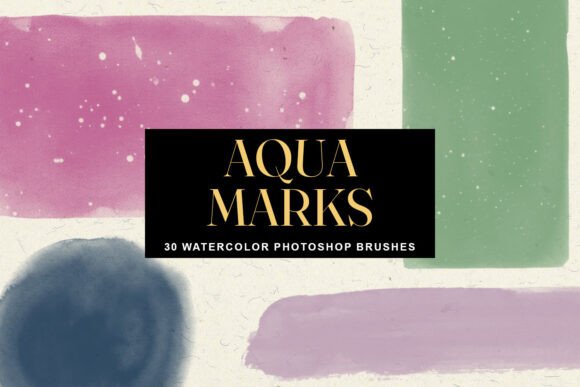
If you're a digital artist or designer looking to add a soft, organic feel to your work, Aqua Marks - 30 Brushstrokes PS Brushes might be the perfect addition to your toolkit. These 30 high-resolution Photoshop stamp brushes are designed to bring the natural beauty of watercolor into your digital workflow, without the mess or unpredictability of traditional painting.
What Makes Aqua Marks Unique?
Each brush in the Aqua Marks collection was created using advanced AI technology to replicate the texture, flow, and grain of real watercolor. Unlike standard digital brushes that can feel flat or artificial, these brushes deliver a realistic, hand-painted aesthetic that blends seamlessly into your designs. With brush sizes ranging from 2300px to 5000px, they’re ideal for large-scale projects where clarity and detail matter.
As stamp brushes, Aqua Marks allow for quick and intuitive placement. Instead of painting with strokes, you simply click or tap to apply a pre-formed watercolor shape. This makes them incredibly efficient for adding background textures, framing elements, or artistic accents in a matter of seconds.
Versatile Shapes for Every Design Need
The Aqua Marks set includes a diverse range of brush shapes, each serving a unique visual purpose:
- Long, flowing washes for soft backgrounds
- Soft rectangular shapes for gentle borders or panels
- Splatters for dynamic, energetic accents
- Organic blobs for abstract textures
- Bold swipes for dramatic visual impact
- Textured gradients for depth and dimension
Whether you're working on branding materials, mood boards, packaging, or personal art projects, this variety ensures you’ll always have the right brush at your fingertips.
Why Digital Artists Are Turning to Aqua Marks
Modern digital artists and designers are constantly seeking tools that balance efficiency with creativity. Aqua Marks meets this demand by offering the expressive qualities of watercolor with the control and flexibility of Photoshop. Here’s why many are making the switch:
- Speed and Precision: Stamp brushes eliminate the need for complex layering or blending techniques. You can place a realistic watercolor shape exactly where you want it in a single click.
- Customization: Aqua Marks are easy to recolor, resize, and blend. You can layer multiple brushes to create rich, complex textures that mimic real-world media.
- High Resolution: With brush sizes up to 5000px, your designs remain crisp and detailed even in large formats like posters or print packaging.
- Timeless Aesthetic: Watercolor has a calming, artistic appeal that works well across a wide range of design styles—from minimal branding to whimsical scrapbooks.
Applications Across Creative Industries
Aqua Marks is more than just a tool for illustrators. Its versatility makes it a valuable asset across multiple creative fields:
- Graphic Design: Use Aqua Marks to create soft backgrounds, textured overlays, or elegant dividers in editorial layouts.
- Branding and Packaging: Add a touch of organic elegance to logos, product labels, or stationery with subtle watercolor elements.
- Scrapbooking and Journaling: These brushes are perfect for digital scrapbook pages, bullet journals, and mood boards where a handmade feel is desired.
- Printable Art: Whether you're selling digital downloads or creating wall art, Aqua Marks can help you achieve a painterly style with minimal effort.
- Photography: Frame and enhance your photos with soft watercolor textures that add warmth and depth.
How to Use Aqua Marks Effectively
While Aqua Marks is designed to be user-friendly, a few tips can help you get the most out of these brushes:
- Experiment with Blending Modes: Try overlay, multiply, or screen modes to see how Aqua Marks interact with other layers in your composition.
- Layer for Depth: Combine multiple Aqua Marks brushes to build complex textures and patterns.
- Adjust Opacity: Lowering the opacity of a brush can create subtle background effects without overpowering your design.
- Recolor with Hue/Saturation: Since Aqua Marks brushes are grayscale, you can easily recolor them using Photoshop’s adjustment layers.
Compatibility and Setup
Aqua Marks - 30 Brushstrokes PS Brushes come in the .abr format, which is compatible with Adobe Photoshop and many other design programs that support Photoshop brushes. Installation is straightforward—simply load the brush file into Photoshop via the Brush Panel or Preset Manager.
While designed for Photoshop, these brushes can also be used in applications like Procreate (with brush conversion) and Affinity Photo, making them a versatile choice for multi-platform creatives.
Choosing the Right Brush for Your Project
When selecting a brush from the Aqua Marks set, consider the mood and function of your design:
- For minimalist layouts, opt for soft washes or rectangles to add subtle texture without distraction.
- For bold compositions, use the larger, more dynamic swipes and splatters to create visual energy.
- For handmade or craft-based projects, layer multiple organic blobs and gradients to simulate a layered watercolor painting.
Don’t be afraid to mix and match brushes. Aqua Marks was designed to work together cohesively, so combining different shapes can yield unique and compelling results.
Real-World Examples of Aqua Marks in Use
Let’s look at a few scenarios where Aqua Marks can make a significant impact:
- Wedding Invitations: Use soft washes and floral overlays to create romantic, elegant invitations with a painterly touch.
- Wellness Branding: The calming aesthetic of watercolor fits perfectly with wellness and self-care brands. Aqua Marks can be used to create soft backgrounds, icons, or pattern overlays.
- Children’s Book Illustrations: The playful splatters and organic shapes are great for adding whimsy and charm to digital illustrations.
- Instagram Story Templates: Add a touch of sophistication to your social media with textured backgrounds and soft dividers created using Aqua Marks.
Final Thoughts on Aqua Marks - 30 Brushstrokes PS Brushes
In a digital world where authenticity and organic aesthetics are highly valued, Aqua Marks stands out as a powerful tool for designers and artists alike. By combining the beauty of watercolor with the efficiency of digital tools, it allows creatives to work faster while maintaining a personal, handcrafted look.
Whether you're a seasoned professional or a hobbyist looking to elevate your designs, Aqua Marks - 30 Brushstrokes PS Brushes offers a flexible, high-quality solution for adding watercolor-inspired textures to your work. With its intuitive stamp-style application, wide variety of shapes, and compatibility with Photoshop and other major design platforms, it’s a smart investment for any digital artist’s toolkit.