Comic Panel Layout Stamps for Procreate: A Practical Tool for Streamlining Comic Creation
Comic creation is a multi-layered process that combines storytelling, visual design, and technical execution. Whether you're producing a webcomic, a manga chapter, or a single-page gag strip, the layout of your panels plays a crucial role in guiding the reader’s eye and pacing the narrative. The Comic Panel Layout Stamps for Procreate offer a streamlined solution for artists looking to maintain consistency and efficiency in their panel designs without sacrificing creative control.
How Comic Panel Layout Stamps Fit Into the Creative Workflow
These brushes are designed to fit seamlessly into a digital comic artist’s workflow, particularly those using Procreate on iPad. Traditionally, setting up comic panels involves manually drawing borders, adjusting spacing, and ensuring alignment across the page. This can be time-consuming and prone to inconsistency, especially when working under tight deadlines or managing multiple pages at once.
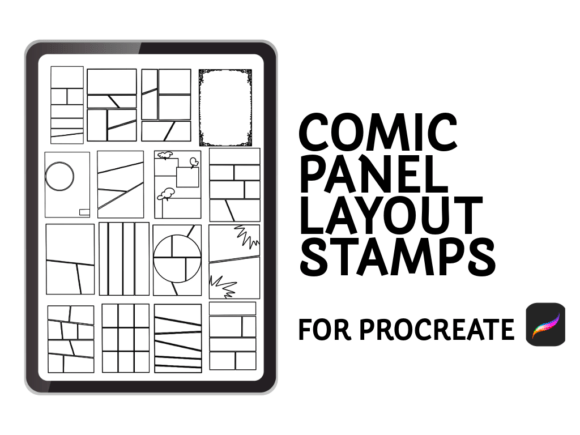
With the Comic Panel Layout Stamps for Procreate, you can bypass the repetitive setup phase and jump directly into storytelling and illustration. The brushes allow you to stamp pre-designed panel layouts directly onto your canvas, giving you a clean, professional structure to build upon. This is particularly useful in the early stages of page layout, where rapid iteration and flexibility are key.
Use Cases and Integration with Other Tools
These brushes are versatile enough to be used across a variety of comic formats, including manga, webcomics, and traditional American-style comics. They work well alongside other Procreate features such as layers, symmetry tools, and custom brushes, allowing for a cohesive and efficient workflow.
- Manga artists can quickly lay out multi-panel pages that follow standard industry formats.
- Webcomic creators benefit from the ability to maintain consistent panel spacing and alignment across long-running series.
- Storyboard artists may find these brushes useful for blocking out visual narratives quickly during pre-production.
Additionally, the stamps integrate well with external tools like scriptwriting software, digital inking brushes, and publishing platforms. For instance, after laying out panels with the stamps, artists can move into detailed inking using brushes optimized for line weight variation, then export the final page directly to a webcomic CMS or print-ready PDF format.
Practical Implementation Tips
Here are some practical ways to incorporate Comic Panel Layout Stamps for Procreate into your creative process:
- Start with a thumbnail sketch before applying panel stamps to ensure your page flow is logical and dynamic.
- Use a separate layer for your panel borders so you can adjust or remove them later without affecting your artwork.
- Customize layouts by resizing, rotating, or combining multiple stamps to create unique compositions.
- Save frequently used layouts as custom stamps or templates to speed up future projects.
One of the key benefits of these brushes is their flexibility. You're not locked into a rigid grid—each stamp serves as a foundation that you can adapt to your specific storytelling needs. This is especially helpful when working with non-linear narratives or action-heavy sequences that require unconventional panel arrangements.
Compatibility and Usability
The Comic Panel Layout Stamps for Procreate are designed specifically for use with the Procreate app on iPad, which makes them a natural fit for digital artists already working within that ecosystem. They are easy to install and do not require any additional software or configuration beyond the standard brush import process in Procreate.
Each of the 20 included layouts is crafted with clean, scalable lines that maintain quality at any zoom level, ensuring your panels look sharp whether you're working on a small phone screen or a full-page comic. This high level of detail contributes to a smooth and distraction-free workflow, especially when you're toggling between layout, sketching, inking, and coloring stages.
Efficiency and Consistency in Production
Consistency is one of the most important aspects of professional comic design. Readers expect a uniform visual rhythm that helps them navigate the story without confusion. The Comic Panel Layout Stamps for Procreate help maintain that consistency by providing standardized panel structures that can be reused across multiple pages or issues.
This is particularly valuable for long-form projects like graphic novels or serialized webcomics, where maintaining a uniform layout style helps reinforce the visual identity of the work. It also simplifies the editing and revision process, as you can easily swap out or adjust panel configurations without redrawing entire pages from scratch.
Long-Term Use and Scalability
While the brushes are ideal for one-off projects or short stories, they also scale well for ongoing content creation. Artists who publish weekly webcomics, for example, can use the stamps to maintain a consistent visual format while still allowing room for creative experimentation. The ability to quickly stamp and adjust layouts means less time spent on technical setup and more time devoted to storytelling and illustration.
Moreover, because these brushes are non-destructive (they can be modified or removed at any time), they offer a level of flexibility that’s hard to achieve with manual panel drawing. This makes them a valuable asset for both beginners learning the fundamentals of comic layout and seasoned professionals looking to streamline their process.
Final Thoughts: A Tool for Every Comic Creator
The Comic Panel Layout Stamps for Procreate are more than just a convenience—they're a practical tool that supports the creative process from concept to completion. Whether you're a hobbyist sketching out your first comic idea or a professional managing a multi-issue series, these brushes help you work smarter without compromising your artistic vision.
By reducing the time and effort required for layout design, they free up mental space for more important decisions—like character development, scene composition, and narrative pacing. And in the fast-paced world of digital comics, that kind of efficiency can make all the difference.