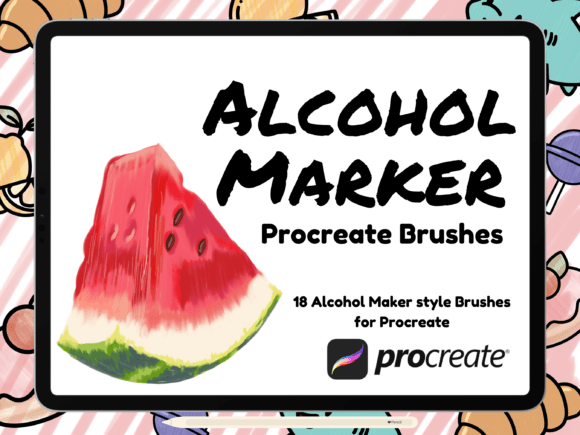
Alcohol Marker Style Procreate Brush Set: What You Need to Know Before You Buy
If you're a digital artist, designer, or hobbyist who enjoys creating vibrant, layered illustrations, you've probably heard of the Alcohol Marker Style Procreate Brush Set. This brush collection, created by HalieKStudio, is designed to mimic the behavior and texture of real alcohol markers like Copic, making it a popular choice for artists transitioning from physical to digital media. But while the promise of realistic marker effects is appealing, there are several important considerations that many users overlook—mistakes that can affect the quality of your work and your overall experience.
What Is the Alcohol Marker Style Procreate Brush Set?
This custom brush set for the Procreate app includes 18 marker-style brushes, including a blender, all optimized for pressure-sensitive styluses like the Apple Pencil. It's compatible with iPad Pro and other iOS devices running Procreate 5 or newer. The brushes are built to replicate the layering, blending, and saturation characteristics of real alcohol markers, which are widely used in illustration, fashion design, and comic art.
Common Mistakes When Choosing and Using This Brush Set
Many buyers jump into downloading and using the Alcohol Marker Style Procreate Brush Set without fully understanding its features or limitations. Here are some of the most common pitfalls and how to avoid them:
1. Assuming It Will Behave Exactly Like Real Markers
While the set is designed to simulate real marker effects, it’s still a digital tool. Some artists expect the same bleed, saturation, and blending behavior they get with physical markers like Copic. This can lead to frustration when results don’t match expectations.
Better approach: Treat the brushes as a digital approximation. Experiment with layering and blending modes to get the most out of them. Give yourself time to adjust your technique to the digital medium.
2. Skipping the Learning Curve
Many beginners assume that because they've used real markers before, they'll instantly master the digital version. However, Procreate's interface, pressure sensitivity settings, and color blending mechanics require a bit of a learning curve.
Better approach: Watch tutorial videos or follow step-by-step guides to understand how each brush functions. Spend time practicing on a test canvas before jumping into a major project.
3. Ignoring Compatibility and Version Requirements
The brush set works best with Procreate 5 or newer and requires an iPad compatible with the Apple Pencil. Some users try to use it on older devices or versions of the app and find the brushes don't respond as expected.
Better approach: Check your iPad model and Procreate version before purchasing. If you're using an outdated system, consider updating before downloading the brush set to avoid performance issues.
4. Misunderstanding Licensing and Usage Rights
One of the most overlooked details is the licensing agreement. Purchasing the brush set does not transfer ownership. You are not allowed to alter, reproduce, share, or redistribute the brush files in any form—digital or physical.
Better approach: Respect the creator's terms. Use the brushes strictly for your personal or commercial projects as permitted. If you're creating content for clients or selling digital art, ensure you're not violating any usage rights.
How These Mistakes Affect Your Results
Using the Alcohol Marker Style Procreate Brush Set without understanding its nuances can lead to several issues:
- Lower quality output: Misuse of blending brushes or incorrect layering techniques can make your artwork look flat or muddy.
- Wasted time: Artists who don't adjust their workflow to the digital format may find themselves redoing work or struggling to achieve desired effects.
- Licensing issues: Unauthorized sharing or resale of the brush set could result in legal consequences or removal of your content from platforms.
What to Check Before Downloading or Using the Brush Set
Before you commit to using the Alcohol Marker Style Procreate Brush Set, take a few minutes to verify the following:
- Device compatibility: Ensure your iPad supports the Apple Pencil and can run the latest version of Procreate.
- Brush preview images: Look at sample artwork created with the brushes to see if they match your style and needs.
- Creator reputation: Research HalieKStudio or the seller to ensure they're a trusted source with positive reviews.
- Usage terms: Make sure you understand what you can and cannot do with the brush set.
Realistic Examples of Better Brush Usage
Consider the following scenarios where understanding the brush set leads to better outcomes:
- Example 1: An artist tries to use the blender brush too early in the process and ends up losing vibrancy in their colors. By waiting until later stages and using light pressure, they achieve smoother gradients without dulling the image.
- Example 2: A digital illustrator assumes the brush set will layer like traditional markers and ends up with harsh transitions. After adjusting layer opacity and using lighter strokes, the final image looks more natural and professional.
Making the Most of Your Digital Marker Experience
The Alcohol Marker Style Procreate Brush Set is a powerful tool when used correctly. Whether you're a seasoned illustrator or a beginner, taking the time to understand how the brushes work—and avoiding common mistakes—can significantly improve your digital art experience.
By respecting the creator's terms, optimizing your device setup, and adjusting your technique to suit digital workflows, you’ll get the most out of this unique brush set. Don’t rush into using it without preparation—your future self (and your artwork) will thank you.