50 Flower Brush Procreate: Flower Maker for Creative Digital Artists
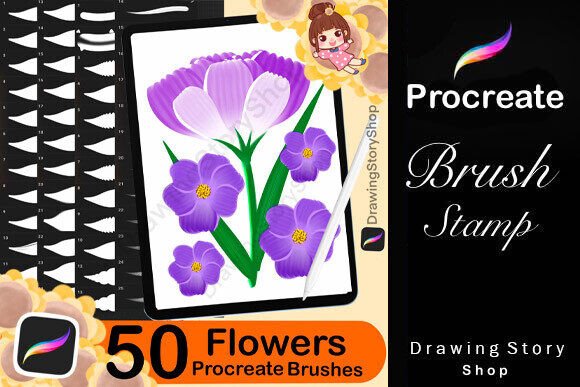
If you're a digital artist, designer, or creative entrepreneur using Procreate on your iPad, you might be looking for ways to streamline your workflow while adding botanical beauty to your projects. The 50 Flower Brush Procreate: Flower Maker is a custom brush set designed to help you do just that. It includes a curated collection of petal and leaf brushes that let you create detailed floral illustrations with minimal effort. Whether you're designing greeting cards, social media graphics, or printable art, this brush set gives you the tools to work faster and more expressively.
What You Get with Flower Maker for Procreate
The Flower Maker pack contains a total of 51 brushes, including:
- 26 Petal Brushes – Different shapes and sizes for creating unique blossoms
- 25 Leaf Brushes – Varied foliage styles to complement your floral designs
All brushes are optimized for the Procreate app, making it easy to layer, blend, and customize your botanical illustrations. After purchase, you'll get immediate access to the brushes and a helpful PDF guide that walks you through the import process step by step.
Who Can Benefit from Flower Maker Brushes?
This brush set is especially useful for creators who frequently work with nature-themed designs. Here are a few examples of how different users might apply it:
- Freelance illustrators can quickly build floral backgrounds for client projects.
- Small business owners can design branded packaging, social media posts, or product mockups featuring custom floral patterns.
- Educators may use the brushes to create engaging visual aids or printable worksheets for students.
- Bloggers and content creators can enhance their digital layouts with organic, hand-drawn elements.
Whether you're a seasoned Procreate user or just getting started, these brushes can help you bring a natural, artistic touch to your digital work.
Real-World Uses for Flower Maker in Creative Work
Let’s look at some practical scenarios where the 50 Flower Brush Procreate set can make a difference:
- Designing custom greeting cards – Use the petal brushes to create one-of-a-kind floral arrangements for birthdays, weddings, or seasonal cards.
- Creating digital stickers – Combine leaf and petal brushes to make botanical stickers for apps like iMessage or Notability.
- Building Instagram graphics – Add soft floral accents to quote images, promotional posts, or personal branding visuals.
- Illustrating planners and journals – Use the brushes to decorate digital bullet journals or printable planners with botanical flair.
- Designing website graphics – Incorporate hand-drawn flowers into blog headers, banners, or landing page visuals.
Because the brushes are easy to layer and customize, you can mix and match petal and leaf styles to suit any theme or color scheme.
How to Use Flower Maker Brushes in Procreate
Getting started with the Flower Maker brushes is simple. Once you've downloaded and imported them into Procreate, you can begin experimenting with different brush sizes and blending modes. Here are a few tips to make the most of them:
- Try different brush sizes – Smaller petals work well for detail, while larger ones are great for bold centerpieces.
- Use blending modes creatively – Overlay or multiply settings can help you achieve more realistic shading and depth.
- Combine with other Procreate brushes – Pair the floral brushes with texture or ink brushes for more dynamic compositions.
- Customize colors – Change the hue and saturation to match your project's palette or create seasonal variations.
With a little practice, you’ll be able to build complex floral arrangements in just a few minutes—no drawing skills required.
What to Consider Before Buying Flower Maker
Before purchasing the 50 Flower Brush Procreate set, keep the following in mind:
- You must own an iPad and the Procreate app – These brushes are specifically made for use within Procreate and won't work in other drawing programs.
- Brushes are for personal and commercial use – You can sell digital prints, stickers, or artwork made with these brushes, but you cannot resell or redistribute the brushes themselves.
- Learning curve may vary – If you're new to Procreate, you might need to spend some time learning how to layer and blend brushes effectively.
It's also a good idea to test out the brushes in a few sample projects before committing to a full design, especially if you're planning to use them for client work or product creation.
Why Flower Maker Stands Out Among Procreate Brushes
Many Procreate brush sets offer floral textures or patterns, but what makes Flower Maker unique is its focus on usability and customization. Unlike static stamps or complex brushes that require fine-tuning, these petal and leaf brushes are designed to feel intuitive and natural in your workflow. Whether you're building a quick background or a detailed bouquet, the brushes respond well to pressure and speed, giving your work a more organic, hand-drawn feel.
Final Thoughts on 50 Flower Brush Procreate
The 50 Flower Brush Procreate: Flower Maker is a valuable resource for anyone who wants to incorporate floral elements into their digital art without spending hours drawing from scratch. From bloggers to small business owners, this brush set offers a practical, time-saving way to add botanical beauty to your projects. Whether you're creating digital products, personal art, or professional designs, Flower Maker helps you work smarter and more creatively in Procreate.